What Is a Data Tiering Archive?
A data tiering archive is a system that separates where your files appear to live from where the bytes actually live. Every file keeps its familiar path, its familiar name, its familiar place in a folder — but the physical data behind it can move between storage tiers automatically, based on how often it's actually used. Nothing about the way you browse or open files has to change.
Three tiers usually cover it:
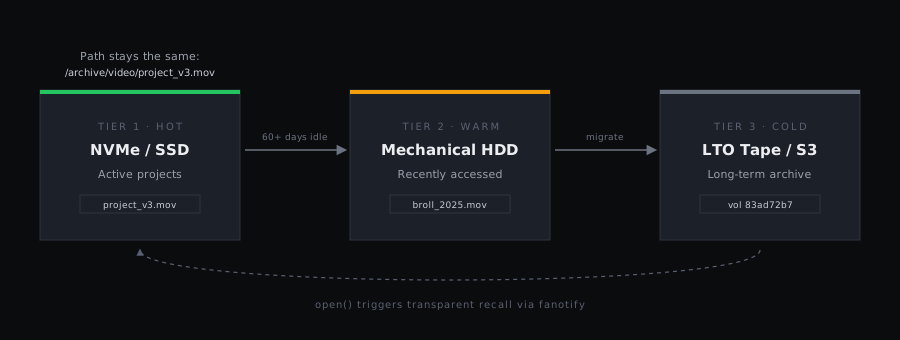
The mechanism that makes this work is what HuskHoard calls stubbing. When a file's data is migrated to a colder tier, the original file is replaced with a tiny placeholder — a stub — that carries the file's real size, checksum, and storage location in its extended attributes. Your file manager, backup software, and file browser all still see a 50GB file sitting exactly where it always was. Nothing on the hot tier is actually holding those 50GB anymore; the stub itself is a few kilobytes at most. Try to open the file, though, and the illusion resolves itself instantly: the system fetches the real data and hands it back, transparently.
This is the core promise of a data tiering archive: your directory structure becomes a complete map of everything you own, regardless of which physical device is actually holding it.
Why Choose an Open Source Data Tiering Archive?
Hierarchical storage management (HSM) isn't a new idea — mainframes have done it since the 1970s, and enterprise vendors have sold tiering appliances for decades. What's changed is who needs it. Media producers, research labs, and increasingly ambitious home labs are all sitting on datasets that used to be the exclusive problem of enterprise IT departments. An open source data tiering archive brings the same capability to anyone running Linux, without an enterprise budget or an enterprise support contract.
The Technology Behind a Modern Data Tiering Archive: Fanotify vs. FUSE
Most existing open source tiering projects reach for FUSE (Filesystem in Userspace) to intercept file access. FUSE works, but it comes with a real cost that's easy to underestimate until you've lived with it.
The FUSE Tax
A FUSE filesystem has to be the mount point. Your existing directory either has to move under that mount, or you're stitching things together with bind mounts. Every single filesystem call — not just the rare ones that need intervention — takes a round trip through userspace, adding latency and CPU overhead to routine, local file access. And if the FUSE process hangs or crashes, the entire mount point can hang with it, taking down every application reading from that path.
Fanotify
Linux's fanotify API lets a userspace daemon watch a directory tree that already exists, on whatever filesystem is already there — no remounting, no bind mounts. In permission mode, the kernel pauses a process's open() call and asks the daemon for a verdict before letting it through. For local files, that verdict comes back in microseconds. For files that need to be recalled from a colder tier, the daemon fetches the data first, then allows the call. Either way, only the calls that actually need intervention pay any cost at all.
This is the mechanism HuskHoard uses for its own data tiering archive implementation: a fanotify permission event fires, a Rust daemon checks a catalog to see whether the requested file is local or needs recall, and either allows the request immediately or streams the data in first. The calling application never sees an error — just, occasionally, a slower open() than usual. For a closer look at exactly how that interception works at the kernel level, see our deep dive on fanotify and the Linux filesystem stack.
Designing Your Data Tiering Archive Hardware
Software handles the movement; hardware determines what you're moving between. Most data tiering archive builds land on some version of the following.
The Performance Tier: Your Landing Zone
Everything gets written here first. A single fast NVMe drive works for a home lab, but a small mirrored or RAID-Z pool on ZFS — or an equivalent BTRFS setup — is worth the extra complexity if you care about protecting the data before it's had a chance to migrate anywhere else. ZFS in particular pairs well with a tiering layer: its checksumming catches silent corruption on the hot tier, complementing the checksum verification a tiering system already does for cold storage.
The Archive Tier: Where Cold Data Actually Lives
- LTO tape — the standard for long-term, power-off durability and bit-rot resistance. A cartridge sitting on a shelf draws no power and can't be reached over a network, which makes it a natural fit for both cost savings and ransomware resistance.
- S3-compatible object storage — useful for off-site durability, whether that's a cloud provider or a self-hosted MinIO instance on a second machine.
- Cold HDDs — SMR or CMR disk-to-disk archiving that trades tape's power savings for much faster recall times, useful when a dataset is cold but you still want retrieval measured in seconds rather than minutes.
Most builds combine at least two of these — tape for the coldest, largest datasets and a small pool of cold disks for anything that needs faster recall than a robot can deliver.
Implementing a Data Tiering Archive with HuskHoard
HuskHoard is an AGPL-licensed, Rust-based implementation of everything described above: fanotify-based interception, stub files, a searchable catalog, and policy-driven migration across disk, cloud, and LTO tape. Here's the shape of getting one running.
cat, an editor's open dialog, a backup job's directory scan — triggers a fanotify event. HuskHoard resolves it against the catalog, retrieves the data, and lets the call through. No special commands required.A policy file for a video archive tiering to LTO after two months of inactivity looks like this:
And recall looks exactly like a normal, if occasionally slow, file read:
Because HuskHoard maintains a catalog separate from the physical media, you can search your entire data tiering archive — including volumes that are sitting on a shelf — without inserting a single cartridge. The catalog already knows what's on each volume from when it was written.
Real-World Use Cases for a Data Tiering Archive
The pattern above — hot landing zone, automatic migration, transparent recall — applies well beyond any one industry. A few places it shows up most often:
Media Production
4K and 8K raw footage fills a NAS fast, and most of it is only actively edited for a few weeks per project. A data tiering archive keeps the current cut on fast local storage while automatically moving finished projects and unused takes to tape, freeing up the expensive tier for what's actually being worked on today — without anyone having to remember to move files manually.
Research and Scientific Data
Grant and regulatory requirements often mandate that datasets be retained for a decade or longer, even though they're read once, published against, and rarely touched again. Tiering that data to WORM-protected tape satisfies the retention requirement at a fraction of the cost of keeping it on spinning disk, while keeping every dataset discoverable and technically "present" in the same directory structure researchers already use.
Home Labs
A large Linux ISO mirror or Plex media library can easily outgrow a home NAS's budget for always-on drives. Tiering rarely-watched libraries to a cold disk pool — or even an old drive repurposed as an archive tier — keeps a home lab's storage costs proportional to what actually gets used, not what's technically stored.
Conclusion: The Future of Linux Storage
The core idea behind an open source data tiering archive isn't complicated: keep your directory structure as a complete, honest map of everything you own, and let cheaper storage handle everything you're not actively using. What makes it practical on Linux today is fanotify — a mechanism that lets a userspace daemon intervene only when intervention is actually needed, with no FUSE tax on routine access and no proprietary format standing between you and your own files.
The result is lower power bills from drives that spend most of their life spun down, effectively unbounded capacity as your archive tier grows independently of your fast tier, and a system whose behavior you can actually read and verify rather than take on faith. Ready to build your own? Check out the HuskHoard GitHub repository to start building your own open source data tiering archive today.